AA Browser vs CarStream: Which Works on Android 15 and 16?
AA Browser vs CarStream on Android Auto: see which works on Android 13 to 16, how to install it, and whether official YouTube makes it moot.
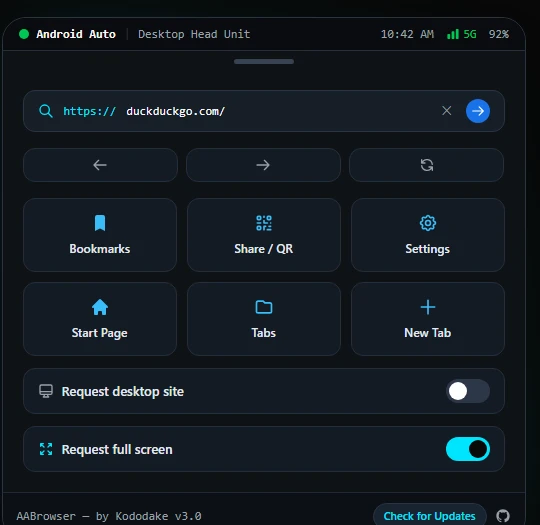
AA Browser is a free, open-source web browser that runs on your Android Auto screen, so you can read, search, and stream while your car is parked. It uses the Chromium WebView on your phone, needs no root, and works with any head unit that supports wired or wireless Android Auto.
This guide covers what the app does, which phones and cars it works with, and how to install it safely. If you are new to it, start with the installation guide. If something isn't working, the troubleshooting page covers the common failures.
Android Auto limits apps mostly to navigation, calls, and media. AA Browser adds a full web browser to that screen. It was created by kododake and is maintained by open-source contributors under the GPL v3 license. This site is an independent guide and is not the developer's website. The source code is on GitHub at cmacrowther/aa-browser (forked from the original project by kododake).
People mostly use it during downtime in a parked car:
Buttons, tabs, and the address bar are scaled for car touchscreens, so they are easier to hit than a phone layout.
Engineered specifically for fingertip precision and vehicle console usability.
Switch between pages with touch controls.
Hides the Android Auto status bars for more screen space.
Pin charging maps or weather pages to the start page.
Lower glare for evening use.
Local storage only: History and bookmarks stay on your phone (verified in our privacy policy and the open source code).
Cars with built-in Android Automotive OS (Polestar, Volvo, Renault) don't use Android Auto projection. For those, see our AA Browser vs Vivaldi comparison.
| Requirement | Specification | Status / Notes |
|---|---|---|
| Smartphone OS | Android 14 or Android 15+ | Fully Supported |
| Android Auto App | Android Auto 10.0+ with Developer Mode | Required for Unknown Sources |
| Vehicle Head Unit | Any car screen with wired/wireless Android Auto | Universal Support |
| Android Automotive OS | Native in-car Android (Polestar, Volvo, Renault) | Use Vivaldi from Car Play Store |
Follow this 5-step summary to sideload safely, or explore our full installation guide for complete instructions.
Open your phone Settings > Android Auto, scroll down to Version, and tap it 10 times consecutively until Developer mode is enabled.
In Android Auto settings, tap the three-dots (⋮) menu, select Developer settings, and toggle "Unknown sources" ON.
Download the verified AABrowser-v3.0.apk directly onto your phone.
Verify the cryptographic checksum below before launching the package to guarantee authentic binary integrity.
Open the file in your phone's file manager, tap Install (choose "Install Anyway" if prompted by Play Protect), connect to your car, and launch AA Browser from the app grid while parked.
Verify using PowerShell: Get-FileHash .\AABrowser-v3.0.apk or terminal: sha256sum AABrowser-v3.0.apk.
Tutorials, release notes, and in-car browser comparisons.
AA Browser vs CarStream on Android Auto: see which works on Android 13 to 16, how to install it, and whether official YouTube makes it moot.
We are excited to announce AA Browser v3.0, introducing Material 3 design, full multi-tab switching, customizable quick links, and 60fps touchscreen rendering.
Common questions about safety, root requirements, compatibility, and video.
It is open source under GPL v3, so anyone can inspect the code. Download from the GitHub release when possible, and compare the SHA-256 hash on our version history page before installing. Sideloading always carries some risk, so use only files you have verified.
This guide lists Android 14 and 15 as the supported versions for AA Browser v3.0. Older versions (Android 13 and below) are untested with v3.0 and may experience installation errors or WebView crashes; older setups can try the archived v2.2 build on our version history page.
No. It installs as a standard sideloaded app.
No. It is intended for parked or passenger use only.
It works with any car that supports wired or wireless Android Auto. Cars with native Android Automotive OS need a different browser, such as Vivaldi from the car's app store. Tesla vehicles don't support Android Auto, so this app does not apply.
Yes, for open HTML5 web video. We verified playback on YouTube, Vimeo, and web video players while parked, with audio routed through car speakers. However, DRM-protected streaming services such as Netflix, Hulu, Disney+, and Amazon Prime Video do not work because Android Auto projection does not support Widevine L1 hardware decryption.
AA Browser is designed strictly for vehicle occupants while the automobile is safely parked with the parking brake engaged, or for passengers. Never interact with or view web content while operating a vehicle. Obey all regional driving regulations and road safety laws.
Download verified AA Browser APK releases, verify SHA-256 hashes, and follow our 5-step sideloading walkthrough.